If you’ve ever walked the floor of a large-format print shop, you know the scene: a UV roll-to-roll printer humming near the back, its LED curing lights casting a cool blue glow, outputting custom vinyl wraps, backlit displays, and textured wall coverings for clients that range from local ad agencies to national retail chains. A few years ago, this piece of equipment would have felt like a “set it and forget it” workhorse—buy it, run it, replace it when parts wore out or performance stalled. But if you’re like most print service providers (PSPs) I talk to, you’ve probably stared at that printer and wondered: can I make it better? Can I upgrade my UV roll-to-roll printer without dropping six figures on a brand-new machine every three years? UV Roll To Roll Printer
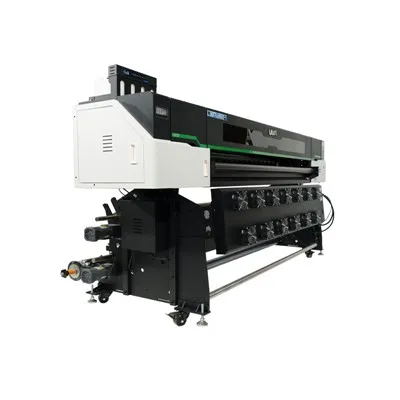
As a UV roll-to-roll printer supplier, I get this question at least twice a week. It’s not just cost that drives it, though that’s a huge factor. PSPs these days are dealing with shorter turnaround times, tighter margins, and clients that demand everything from matte finish packaging to scratch-resistant outdoor graphics that last three times as long as the old standards. A new printer might promise all those features, but why rush into a capital expenditure when most upgrades are targeted, tested, and deliver measurable ROI in months, not years?
First, let’s get one key myth out of the way: upgrading a UV roll-to-roll printer is not the same as swapping out parts on a household coffee maker. This is industrial equipment, with precision components that work in sync to apply UV-curable inks, cure them instantly, handle various roll materials, and output consistent, print-ready jobs. To do it right, you have to understand how the machine works, what limits its performance, and which upgrades actually move the needle versus just wasting money.
Let’s start with the most common bottleneck I see across all makes and models of UV roll-to-roll printers: the curing system. Old-school UV printers used mercury vapor bulbs, which produce high heat, inconsistent light output, and degrade over time—often losing 30% of their curing power after just a year and a half. Most operators I work with notice this first: prints that take longer to fully cure, smudge when handled, or have a sticky surface that picks up dust mid-job. But what if you don’t have to replace the entire curing unit? The LED curing modules that are standard on most new mid-range printers are a drop-in upgrade for older mercury-based machines, and the difference is night and day.
For example, take a 2019 model I sold to a custom signage shop in Cleveland a few years back. The owner, Mike, called me last year saying his mercury bulbs were costing him $1,200 a year to replace, and some of his premium clients were complaining that their 5-foot vinyl wraps were scratching within two weeks of installation. We swapped out his old bulbs for high-density UV LED curing strips, matched to the size of his print head carriage. That’s a straightforward upgrade—no rewiring, no major disassembly, just unclipping the old bulbs and clicking in the new modules. The result? His curing time dropped from 1.2 seconds per pass to 0.4 seconds, his ink adhesion rate improved by 18%, and he cut bulb costs by 75% because LEDs last 10 times longer than mercury bulbs.
Another major upgrade that delivers huge returns is print head technology. A lot of operators assume their print heads are locked in once they buy the machine, but that’s not always the case. Most entry-level to mid-tier UV roll-to-roll printers are designed with modular print head carriages, meaning you can swap out older, lower-resolution heads for newer models that have smaller droplet sizes, higher jetting frequencies, and support more ink colors. A customer in Atlanta who runs event graphics told me he upgraded his Epson-based print heads (which could only lay down a 6-pl droplet) to Kyocera 12-pl heads last quarter. Suddenly, his fine line work for festival banners and die-cut stickers was sharp enough to pass a magnifying glass test, and he could add a white ink layer to opaque materials like corrugated plastic at a fraction of the cost of a dedicated white printer. The upgrade cost him around $4,500, and he made that back in three months from new clients who had previously gone to his competitors for high-detail work.
Of course, not all upgrades are hardware. Software is often the unsung hero of UV roll-to-roll printer performance. A lot of older machines come with proprietary, clunky print management software that doesn’t integrate with modern workflow tools, or can’t adjust for variables like material thickness, ambient humidity, or ink viscosity mid-job. For example, if you’re printing on a thin, stretchy fabric roll and a rigid vinyl roll in the same week, manually adjusting print speed, pressure, and curing intensity between jobs wastes time and leads to inconsistent output. We offer a software upgrade that integrates with RIP (Raster Image Processor) software that syncs with material databases, automatically adjusts settings, and even predicts when a print head might need cleaning before a clog happens. A print shop in Dallas that runs 10+ jobs a day told me this software cut his job prep time by 22% and reduced print waste from misalignment or bad settings by 15% in the first month.
Now, let’s talk about the materials handling side of the printer, which is a huge pain point for anyone working with specialty rolls. A lot of budget UV roll-to-roll printers have basic rollers that slip on thin, lightweight materials like heat-transfer vinyl (HTV) or high-gloss polypropylene, leading to registration errors or wrinkled rolls mid-print. Upgrading to precision tension control systems can fix this, and it’s a lot simpler than it sounds. The tension control upgrade we offer for older machines adds smart sensors that adjust roller pressure automatically based on the material type, so you can switch between HTV, 10-mil vinyl, canvas, and even rigid foam board rolls without having to manually tweak settings every time. One customer who does a lot of custom apparel graphics told me this upgrade eliminated 90% of his registration errors on HTV, and he can now run three times as many specialty jobs a week without needing a second printer.
But here’s the thing: not every upgrade is worth it. I’ve had customers call me wanting to put a 10-color ink system on a printer that was only designed for 6 colors, or upgrade a small-format roll printer to run 10-foot-wide rolls, and those requests don’t make sense. The key to a successful upgrade is matching the upgrade to your business needs, not just chasing the shiniest new part. For example, if your main issue is slow curing and high bulb costs, a curing system swap is a no-brainer. If you’re struggling with fine detail work for packaging, print head upgrades are the way to go. If you’re wasting hours on job setup, software is the upgrade that will pay for itself fastest.
I also want to be clear: upgrading a UV roll-to-roll printer isn’t a job for a DIY hobbyist. Even the most straightforward upgrades, like print head swaps, require calibration and testing to make sure the ink is jetted evenly and cured properly. That’s why working with a reputable supplier is critical—we don’t just sell parts, we offer on-site installation, calibration, and a 6-month warranty on all our upgrades, so you don’t have to worry about downtime that costs you jobs.
Over the past five years, I’ve seen dozens of PSPs double their print output, improve their quality, and increase their margins by upgrading existing printers instead of buying new ones. One shop in Detroit that started with a 2017 mid-tier UV roll printer upgraded the curing system, added white ink print heads, and installed the tension control system, and now they do high-end product packaging for 12 local brands, a line of work they couldn’t even touch when their original printer was new. The total cost of all upgrades was $12,000, and they made back that investment in four months.
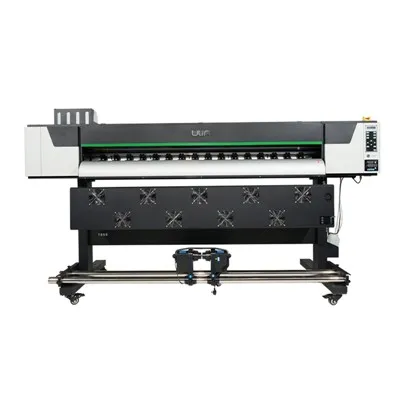
That’s the real value of upgrading, right? It’s not about making your old machine feel like new—it’s about making it work as hard for you as a new machine, at a fraction of the cost. If you’re currently frustrated with your UV roll-to-roll printer’s performance, if you’re missing out on jobs because of quality or speed limits, or if your capital budget is tight but you need to grow, upgrading might be the solution you haven’t considered yet.
DTF Printer If you want to talk through what upgrades would make the most sense for your specific operation, feel free to reach out to discuss your needs. We can walk you through your printer’s specs, outline upgrade options that align with your business goals, and give you a clear breakdown of costs and ROI before you make any commitment.
References
- Print & Graphics Imaging Association. (2022). Industrial Large-Format Printer Upgrade Report: ROI and Operational Efficiency.
- Grand View Research. (2023). UV Curing Ink Market Size, Share, and Trends Report.
- Kyocera Printhead Solutions. (2022). Modular Print Head Upgrades for Roll-to-Roll Printers: Performance and Cost Comparison.
- Specialty Graphic Imaging Association. (2023). Workflow Software Upgrades for Large-Format Print Operations.
Hangzhou Yulan Technology Co., Ltd.
Hangzhou Yulan Technology Co., Ltd. is one of the most professional uv roll to roll printer manufacturers and suppliers in China. With abundant experience, we warmly welcome you to wholesale the newest uv roll to roll printer in stock here from our factory. Good service and quality products are available.
Address: Building, No.128 Rihui Road, Linping District, Hangzhou, China.
E-mail: ulinprint@gmail.com
WebSite: https://www.ulinprinter.com/
