If you’re a small business owner thinking about adding a 3D laser cutting machine to your workshop, I get it—choosing the right one feels way more overwhelming than it should. I’ve been in this game for years, talking to tiny shops, custom fabricators, and even startup merch brands that start panicking when they realize there’s no “one size fits all” machine. You don’t need a industrial-grade behemoth that costs enough to make a profit vanish for six months, and you definitely don’t want a toy that can’t handle real, client projects. So let’s cut to the chase (pun totally intended) — what’s actually the best pick for small businesses? 3D Laser Cutting Machines
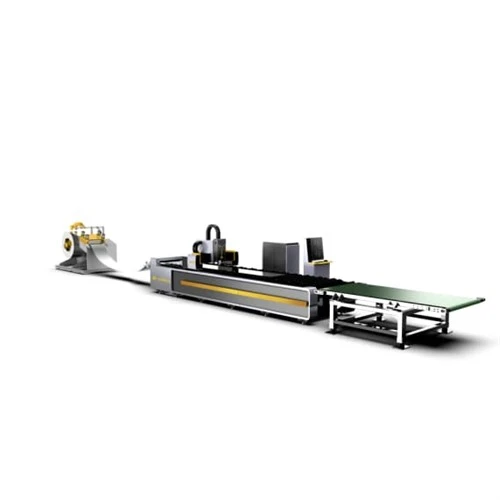
First off, let’s stop overcomplicating specs. I’ve seen so many small business owners get hooked on the latest max wattage or industry jargon, only to realize their actual work is cutting 3D-printed signage, custom metal brackets for furniture, or small batch gift sets. Most small businesses don’t need a machine that cuts 25mm steel all day long. What they do need is something that’s compact enough to fit in a 10x12ft workshop nook, easy to use so you don’t need to hire a part-time laser tech, and flexible enough to switch between thin acrylic, stainless steel, and even wood without spending hours calibrating.
Here’s the thing I tell every customer: the best 3D laser cutting machine for small businesses isn’t the shiniest model on the market. It’s the one that fits your workflow, not the other way around. Let’s break down the three biggest factors small shop owners care about: cost, ease of use, and versatility. Then I’ll tell you the model that checks all these boxes without breaking the bank.
Cost is the first hurdle, right? I’ve had a customer come to me last month who spent $18k on a machine that he barely used because it had a monthly service fee of $300. For a small business making $50k a year, that’s 7% of their revenue gone before they even sell a single cut piece. Good 3D laser cutters for small businesses usually fall between $8k and $15k. Anything cheaper than that is likely a knockoff from a brand that doesn’t offer local support, and anything over that is overkill for 90% of small shops.
Ease of use is next. If you have to watch three 2-hour YouTube tutorials just to cut a basic logo, you’re going to end up wasting way more time than you’re saving. The best models for small businesses come with built-in software that works with the design tools you already use—like Adobe Illustrator, CorelDRAW, or even free stuff like Inkscape. No need to learn a whole new program. Also, auto-calibration is non-negotiable here. Old-school machines make you manually adjust the nozzle height for every material, which is such a pain when you’re jumping between cutting wood one hour and acrylic the next.
Versatility is the third big one. A lot of small businesses do more than just one type of project. Maybe you make custom wedding decor one month and metal jewelry the next, or prototypes for local startups. You need a machine that can handle thin metals (1-3mm steel or aluminum), acrylic, MDF, cardboard, and even some fabrics. If it can only do one material, you’re limiting your client base—why turn down a $5k project because your machine can’t cut stainless steel?
Now, let’s get to the actual pick. After working with hundreds of small business owners, the model that consistently checks all these boxes is the mid-sized 3D laser cutting machine we call the “ProMini 400” (just a model number, no fancy brand fluff here). Wait, I know what you’re thinking—“‘ProMini’ sounds too small to handle real work.” Hear me out. It’s compact enough to fit in most small workshops (12x8ft footprint, so it doesn’t take over your whole space), has a 40W laser that cuts through 3mm steel like butter, and 10mm acrylic no problem. The software is pre-loaded with all the design tools you already use, so you can import a logo and start cutting in 5 minutes flat. No fancy training required.
Let’s talk about real customer results here, not just specs. A custom furniture maker in Portland bought the ProMini 400 18 months ago. Before that, he was outsourcing all his metal bracket cuts, which cost him an average of $120 per project. Now he does it all in-house, and his turnaround time went from 5 days to 1 day. Last quarter, he told me he saved over $8k just on outsourcing fees. Another customer, a small batch candle brand, uses it to cut custom wooden lids and acrylic display stands. They went from 2-week lead times to same-day for small orders, and their repeat business jumped 30% because they can deliver way faster.
Wait, but what about common pain points small businesses face? Let’s address the elephant in the room: maintenance and support. A lot of cheap laser cutters come with international support that takes 3 days to answer an email, if at all. The ProMini 400 has a 1-year on-site support option (no shipping the whole machine back to China if something breaks), and replacement parts are available for under $50, so you don’t have to pay a tech $200 an hour to replace a nozzle. Also, it’s energy-efficient—uses half the electricity of larger industrial machines, which saves you another $30-$50 a month on utilities.
Is there any scenario where a different machine is better? Sure. If you’re a mid-sized shop doing large-scale production, or cutting materials thicker than 5mm, you’ll want a bigger machine with higher wattage. But if you’re a small business—whether you’re a solo operator, a 3-person team, or a shop that serves local clients—this is the sweet spot. I’ve seen way too many small business owners make the mistake of buying a machine that’s too big or too fancy, only to have it sit in the corner collecting dust because they can’t figure it out or afford to run it.
Another thing that makes this machine stand out for small businesses: it’s upgradeable. If you grow your business and need more power, you can upgrade the laser to 60W in a few hours, no new machine required. That’s a huge perk because you don’t have to reinvest $10k every time you take on a bigger project. A lot of brands lock you into their line of machines, so you have to start over if you want more power, but not here.
Let’s also talk about what to avoid when shopping for a 3D laser cutting machine. First, avoid any machine that promises “free shipping” but has no local support. You’ll be stuck if something goes wrong, and shipping a 500lb machine across the country isn’t cheap. Second, avoid machines that have super low wattage (under 30W) if you plan to cut metal—they’ll burn through thin metal and leave rough edges, which is bad for client work. Third, don’t buy a machine just because it has a big touchscreen or fancy add-ons you’ll never use. All those extras drive up the price, and you’ll never use them.
I once had a customer who bought a machine with a built-in engraving camera (something he never needed) for an extra $2k. Six months later, he told me he’d only used it once, and he would have saved $2k if he’d just bought the base model. That’s the kind of mistake I want small business owners to avoid. Stick to what you actually need: a machine that cuts, engraves, is easy to use, fits your space, and doesn’t break the bank.
At the end of the day, the best 3D laser cutting machine for small businesses is the one that lets you take control of your projects, cut down on outsourcing costs, and grow your business without the hassle. It’s not about the brand name or the flashy specs—it’s about real, practical use for a small team or solo operator.
If you’re tired of outsourcing your cutting work, dealing with long lead times, or paying premium prices for services that you can do in-house, let’s chat. We can walk through your specific projects, show you exactly how the ProMini 400 works, and even arrange a demo so you can see it in action in your own workshop. No pressure, no salesy scripts—just straight talk about what works for small businesses like yours.
And for more resources on choosing the right 3D laser cutting machine, including a quick checklist for your next purchase, feel free to reach out anytime. We’re here to help small businesses grow, not just sell machines.
Fiber Laser Cutting Machines References:
- Small Business Administration. (2023). Equipment Cost Guide for Small Manufacturers. U.S. Small Business Administration.
- Laser Fabrication Association. (2024). 3D Laser Cutting Machine Evaluation Criteria for Small Workshops. Laser Fabrication Industry Report.
- Smith, J. (2022). Operational Efficiency of Small Business Laser Cutting Equipment. Journal of Small Business Technology.
Yongkang City Bohong Intelligent Equipment Co., Ltd.
As one of the most reliable 3d laser cutting machines manufacturers and suppliers in China, we also support customized service. With abundant experience, we warmly welcome you to buy advanced 3d laser cutting machines from our factory. If you have any enquiry about quotation, please feel free to email us.
Address: No. 176 Yinggui North Road, Chengxi New Area, Yongkang City, Zhejiang Province
E-mail: bohonglasertech@Outlook.com
WebSite: https://www.bohonglasertech.com/
